
7 Best Z Wave Alarm System for Home Security
The Abode 4-Piece Wireless Smart Security System is the best z wave alarm system for most buyers because it offers a practical starter package with a central hub and core sensors. Its four-piece setup includes an alarm hub, door or window sensor, motion sensor, and key fob, giving apartments and smaller houses a useful starting point without buying each component separately. The system can also connect with compatible smart-home devices, giving it room to grow.
This guide is for renters, homeowners, and anyone replacing a basic alarm with a connected setup. The biggest factors are wireless range, sensor battery life, app and monitoring costs, and how easily the system can expand. A compact kit may cover one entry point well but need extra sensors for larger homes. The seven picks below are ranked with clear reasons and honest drawbacks for each, so you can compare protection, expansion options, and ongoing costs before choosing.
Quick Comparison
| # | Product | Best For | Price | |
|---|---|---|---|---|
| 1 | Abode 4-Piece Wireless Smart Security System | Small-Apartment Security Starters | ~$219 | View → |
| 2 | 24-Piece WiFi/GSM Home Alarm System | Large-Home Entry Coverage | ~$107 | View → |
| 3 | PGST WiFi/4G Home Alarm System | WiFi Alarm With Cellular Backup | ~$112 | View → |
| 4 | Aeotec Siren 6 Z-Wave Security Siren | Z-Wave Siren Add-On Buyers | ~$80 | View → |
| 5 | Ring Alarm Contact Sensor 6-Pack, 2nd Gen | Multi-Door And Window Monitoring | ~$60 | View → |
| 6 | Napco Prima Home Security System | Professionally Monitored Households | ~$415 | View → |
| 7 | Abode Wireless Smart Security System | DIY Smart-Home Security Users | ~$299 | View → |
7 Top Z-Wave Alarm System Picks
The list is ranked from seventh place down to the top pick, with key features and tradeoffs noted for each system.
7. Abode Wireless Smart Security System

Best for: DIY security across multiple entry points
The Abode 8 Piece Wireless Smart Security System is a starter alarm kit for homes that need coverage across several doors and rooms. It includes a central hub, two motion sensors, one key fob, and four mini door/window sensors. The hub has a built-in 93dB siren, backup battery, and Ethernet connection. At around $299, it costs more than a basic single-room alarm, but includes several sensors before expansion.
Its strongest feature is broad smart-home support. The system works with Apple HomeKit, Alexa, and Google Assistant, while the hub also supports Z-Wave and Zigbee accessories. You can add locks, lights, cameras, water-leak sensors, smoke detectors, and carbon monoxide alarms. Apple users can control the system through the Home app. DIY setup avoids mandatory professional installation, while optional 24/7 monitoring can dispatch police, fire, or medical help for as little as 60 cents per day. Monitoring may also qualify for an insurance discount, depending on your provider.
Pros
- Apple HomeKit support lets you monitor and control the system through the iOS Home app.
- Z-Wave and Zigbee compatibility supports many third-party locks, lights, and sensors.
- The eight-piece kit covers four entry points and two motion-detection areas immediately.
Cons
- The included sensors may not cover larger homes without buying extra accessories.
- Professional monitoring adds a recurring cost, while some insurance discounts depend on the insurer.
6. Napco Prima Home Security System

Best for: Connected home security shoppers
The Napco Prima Home Security System is a starter alarm kit built around a 7-inch touchscreen panel. It includes three window or door transmitters, one PIR motion sensor, wall and tabletop brackets, mounting hardware, and long-life batteries. The panel connects through Wi-Fi and either an AT&T or Verizon cellular network. Around $415, it costs more than basic self-installed alarm kits, but it includes several parts needed for a small home setup.
The panel has a built-in 5MP camera, two stereo microphones, an 85dB piezo sounder, and an LED status light. It supports live video and audio, weather alerts, voice-assistant features, and a rechargeable 3.7V lithium-polymer battery with at least 24 hours of backup power. Z-Wave Plus support lets it control compatible thermostats, dimmers, locks, plugs, and garage controllers. A two-year over-the-counter warranty adds some purchase protection, though activation requires a monitoring agreement through Overwatch Monitoring Group.
Pros
- Includes three entry sensors and a PIR motion sensor for basic coverage.
- Offers Wi-Fi plus cellular connectivity, with AT&T or Verizon network options.
- Supports live panel video, two-way audio, and Z-Wave smart-home devices.
Cons
- A monitoring service agreement is required for activation, adding an ongoing cost.
- The included sensor count may not cover larger homes without extra devices.
5. Ring Alarm Contact Sensor 6-Pack, 2nd Gen
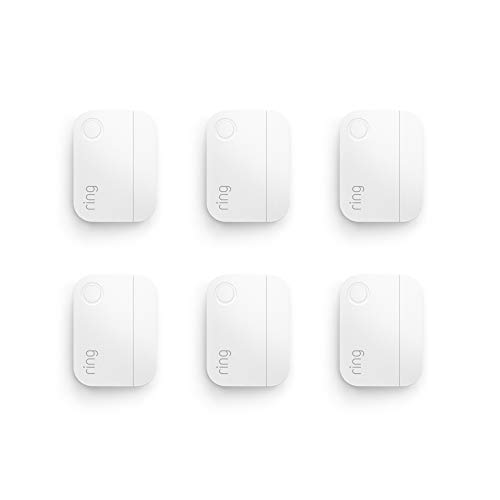
Best for: Ring users covering multiple entry points
The Ring Alarm Contact Sensor 6-Pack adds open-and-close monitoring to six doors or windows. Each sensor uses a smaller, slim design that fits more easily on narrow frames and low-profile trim. Installation requires no tools, so you can attach the units to door or window frames without drilling. The package includes two 3V CR2032 batteries, and Ring lists approximately three years of battery life under typical use.
The main advantage is coverage in one purchase. Around $60, this six-pack costs less than buying several sensors separately, though prices change. Mobile alerts can arrive when a protected entry point opens, but that feature requires a Ring Protect subscription, sold separately. These sensors also cannot work alone. A Ring Alarm Base Station is required, which raises the total setup cost for new users. The smaller housing gives you more placement choices, but buyers should still check the door and frame alignment before mounting. They are designed for basic open-and-close detection, not glass-break sensing or motion detection.
Pros
- Covers six doors or windows with one package.
- Slimmer housing fits more mounting locations.
- Tool-free installation avoids drilling and extra hardware.
Cons
- Requires a Ring Alarm Base Station to operate.
- Mobile alerts require a separate Ring Protect subscription.
4. Aeotec Siren 6 Z-Wave Security Siren
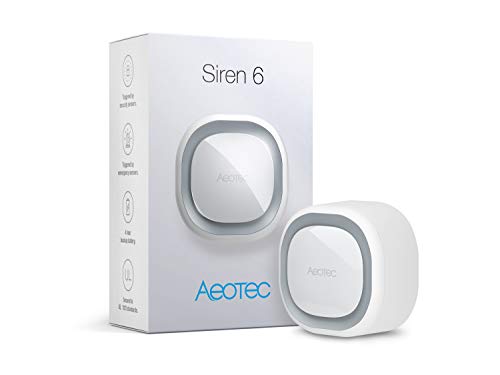
Best for: Z-Wave indoor security alerts
The Aeotec Siren 6 is a wall-mounted indoor alarm for Z-Wave smart home systems. It combines a speaker with a 1,000-lumen strobe, so it can signal security breaches, smoke alarms, or carbon monoxide alerts. Its maximum volume reaches 110dB, but each tone can be adjusted from 80dB to 110dB. Around $80, it costs more than a basic standalone siren, yet it offers broader smart-home control.
The siren includes six security sounds, eight safety sounds, and 30 tones overall. A built-in battery keeps it running for up to four hours during a power outage. You can also pair it with up to three Aeotec Z-Wave buttons for doorbell use, though those buttons are sold separately. Z-Wave Plus and S2 support can improve range and wireless security, with a claimed open-air range of up to 490 feet. Actual coverage depends on walls, interference, and the gateway. Compatible systems include SmartThings, HomeSeer, Open Z-Wave, and Zipabox.
Pros
- Combines a loud 110dB speaker with a bright 1,000-lumen visual alert.
- Offers 30 selectable tones with adjustable volume from 80dB to 110dB.
- Four-hour backup battery helps maintain alerts during power loss.
Cons
- It does not work with Vera, limiting gateway choices for some Z-Wave owners.
- Doorbell use requires separately purchased Aeotec buttons and a compatible Z-Wave hub.
3. PGST WiFi/4G Home Alarm System

Best for: Renters and small homes
The PGST 24-piece alarm kit combines a main alarm hub with wireless sensors, remotes, and an emergency SOS button. It connects through 2.4GHz Wi-Fi or GSM/4G, so it can send alerts through the cellular network if the home internet connection drops. Smart Life and Tuya apps let you arm the system, name each sensor, adjust alarm volume, and set delayed alarms or SMS and call alerts. At around $112, it costs more upfront than a single camera, but it avoids a required monthly subscription.
This kit is built for do-it-yourself setup. The manufacturer says one person can mount the included components with screws in about 10 minutes, though actual setup time depends on sensor placement and app pairing. The hub supports 100 wireless accessory locations, leaving room for extra door contacts, motion detectors, outdoor sirens, or SOS devices. The included SOS trigger and remote control can help children or older adults call attention quickly. Still, the 4G backup may require a compatible SIM and cellular service, which can add a separate cost.
Pros
- Dual Wi-Fi and GSM/4G connections provide a backup alert path.
- 100 wireless slots support expansion for larger floor plans.
- App controls include named zones, delayed alarms, calls, and SMS.
Cons
- Cellular backup may require a separate SIM and service plan.
- The system supports 2.4GHz Wi-Fi, not 5GHz networks.
2. 24-Piece WiFi/GSM Home Alarm System

Best for: DIY security for larger homes
This 24-piece home alarm kit combines door sensors, motion detectors, remotes, and an emergency SOS button in one package. It connects to 2.4GHz WiFi, not 5GHz networks, and also accepts a 4G SIM card for calls and text alerts. App control works through Smart Life or Tuya, so you can arm the system, rename sensors, and check alerts remotely. The price is around $107, though listings can change.
The main unit has a color display for system status, weather, and the date. It supports 10 languages and works with compatible voice assistants. If someone tries to remove the panel, its tamper alarm requires a security code to stop. A triggered sensor can produce an alarm rated above 110dB while sending app notifications, calls, and SMS messages. There are no stated monthly platform fees, but cellular service still requires a compatible SIM plan. Installation is designed for DIY setup, with no professional installer required.
Pros
- The 24-piece bundle covers multiple doors, rooms, and entry points.
- WiFi, 4G calls, SMS, and app alerts provide several notification methods.
- The SOS button and remote control give children or older adults a quick emergency trigger.
Cons
- It supports 2.4GHz WiFi only, so 5GHz networks cannot connect directly.
- Cellular alerts depend on a compatible 4G SIM and its ongoing service costs.
1. Abode 4-Piece Wireless Smart Security System
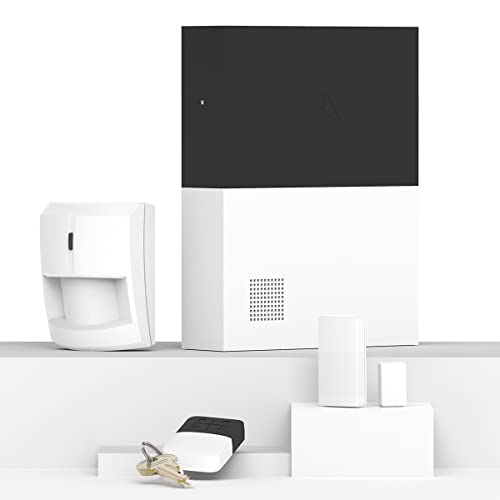
Best for: Apple HomeKit households needing expansion
The Abode 4 Piece Wireless Smart Security System is a starter alarm kit for apartments, houses, and other DIY setups. Around $219, it includes a central hub, motion sensor, key fob, and mini door/window sensor. The hub has a built-in 93dB siren, backup battery, and Ethernet connection. Those basics cover one entry point and one room, but larger homes will need extra sensors.
Apple HomeKit support is the standout feature. You can view and control the system through Apple’s Home app, while Alexa, Google Assistant, and Siri add voice-control options. The hub also works with Z-Wave and Zigbee accessories, including compatible locks, lights, and sensor-equipped devices. Abode sells add-ons for doors, windows, water leaks, cameras, smoke alarms, and carbon monoxide alarms. Optional 24/7 professional monitoring can cost about sixty cents per day, with dispatch support for police, fire, or medical emergencies. Added devices and monitoring raise the total cost.
Pros
- Apple HomeKit certification allows control through the iOS Home app.
- The 93dB siren, backup battery, and Ethernet connection add useful alarm protection.
- Z-Wave and Zigbee support opens access to many third-party smart-home devices.
Cons
- The four-piece bundle provides limited coverage for larger homes.
- Full protection can become expensive after adding sensors, cameras, and monitoring.
Buying Guide
The most important factor is hub compatibility. A Z-Wave alarm system only works as expected when its sensors, siren, and controller share the same regional frequency and platform support.
- Hub compatibility: Confirm support for Z-Wave devices, your local frequency, and the alarm sensors you plan to add. Choose a controller that supports at least 50 devices if you want room to expand.
- Security features: Look for encrypted Z-Wave communication, tamper alerts, a 100-decibel-or-louder siren, and app notifications within seconds. Cellular backup can help during internet outages.
- Starter-kit coverage: Count entry points before buying. A small apartment may need two door sensors, one motion detector, and one siren. A larger home often needs six to 10 sensors.
- Battery performance: Prefer sensors rated for at least one year per battery, with low-battery alerts. A control panel offering four to 12 hours of backup power can cover short outages.
- Total cost: Budget about $150 to $400 for a starter kit, then $20 to $60 per added sensor. Check monthly monitoring fees, which often range from $10 to $40.
If you must compromise, prioritize hub compatibility, since incompatible hardware can make the entire setup unusable.
Frequently Asked Questions
How does a Z-Wave alarm system work?
A Z-Wave alarm system connects sensors, locks, lights, and sirens through a low-power wireless mesh network controlled by a central hub. Each powered device can help relay signals, while battery sensors usually sleep between alerts. Indoor range varies by walls and placement, often reaching about 30 to 100 feet per connection.
What features should I look for in a Z-Wave home alarm?
The key features to look for are a reliable hub, compatible sensors, phone alerts, battery backup, and local control when internet service fails. A setup might include two door sensors, one motion detector, a smoke listener, and a keypad. Confirm that every device lists support for your hub before buying.
Can a Z-Wave security system work without internet?
Yes, some Z-Wave alarm hubs can detect alarms and trigger linked devices without internet, but remote app alerts usually require an active connection. Choose a controller with local automation and battery backup if you need protection during an outage. For example, a local rule can sound a siren when a door sensor opens.
Are Z-Wave alarm systems good for renters?
Yes, these alarms can suit renters because wireless sensors often mount with screws or removable adhesive, and the hub can move to a new home. Ask the landlord before drilling, and check lease rules for sirens or cameras. A small apartment may need only one hub, two entry sensors, and one motion sensor.
Conclusion
The Abode 4-Piece Wireless Smart Security System is the top pick for households that want a compact starter setup with smart-home control. If your priority is broader coverage, pick a larger multi-sensor package instead, since extra contact sensors can protect more doors and windows. Before buying, double-check the equipment’s size, Z-Wave and hub compatibility, included sensor quantity, and current price. Kit names can sound similar, but their contents may differ. Check that the package covers your main entry points and living areas. Also confirm whether the required hub or subscription comes included, or budget for it separately. A quick review of those details can prevent an undersized kit or unexpected costs after purchase.